
Introduction
Url for Pushing Orders:
 $url=https://api.fastcoo-tech.com/API_v2/CreateOrder
The process allows to create shipments in System.
➢ Please follow below tables to understand the parameters details| Name | Mandatory | Input & Length | Description |
|---|---|---|---|
| customerId | YES | String(20) | UID – Account ID |
| secret_key | YES | String(25) | Authentication ID (Provided By Fastcoo) |
| BookingMode | YES | String(5) | Payment Mode CC or COD |
| codValue | YES | Float(10,2) | Total COD amount |
| reference_id | YES | String(50) | Order Number |
| origin | YES | Mediumint(9) | Consignor City |
| destination | YES | Mediumint(9) | Consignee City |
| service | YES | Int(5) | Express or Advance Delivery Service |
| sender_name | YES | String(50) | Consignor Name |
| sender_address | YES | String(100) | Consignor Address |
| sender_phone | YES | String(25) | Consignor Phone |
| sender_email | YES | String(25) | Consignor Email |
| receiver_name | YES | String(30) | Consignee Name |
| receiver_address | YES | String(255) | Consignee Address |
| receiver_phone | YES | String(25) | Consignee Phone |
| receiver_email | YES | String(30) | Consignee Email |
| description | YES | String(250) | Detail of the Shipment/Comment |
| productType | YES | String | Parcel |
| pieces | YES | Int | Number of Pieces of the box |
| weight | YES | Int | Weight of the complete box |
| national_address_id | No | String | National Address ID |
Service Type:
| Service Name | ID |
|---|---|
| Express Service | X |
| Advance Service | X |
▪ Ask for Service ID
   {
"format": "json",
"secret_key":"xxxx",
"method": "CreateOrder",
"customerId": "xxxx",
"param": {
"sender_phone": "9876543210",
"sender_name": "tet",
"sender_email": "test@gmail.com",
"receiver_email": "ashar.k@fastcoo.com",
"description": "Food Products",
"origin": "Riyadh",
"receiver_phone": "9876543210",
"sender_address": "Sulayi",
"receiver_name": "Ashar Khan",
"destination": "Riyadh",
"BookingMode": "COD",
"pieces":"1",
"weight":"1",
"receiver_address": "As Sawadi Khaldiyah",
"reference_id": "newapiref01",
"codValue": "100",
"productType": "Parcel" ,
"national_address_id": "TEST465456"
}
}
❖Response Code
| Code | Reason |
|---|---|
| 200 | Successful |
| 401 | Authentication Error |
| 400 | Already Exist |
| 134 | Order ID should not contain # |
| 135 | Reference ID is Required |
| 126 | Receiver ID is Required |
| 127 | Receiver phone is Required |
| 128 | Receiver City is Required |
| 129 | Receiver City is Incorrect |
Shipment Tracking API
{
"shipment_data": {
"awb_no": "SOF4010321753",
"entry_date": "2020-11-08 17:19:43",
"payment_method": "COD",
"weight": "1.08",
"status": "Delivered",
        "product_type": "",
        "code": "POD",
        "origin": "Riyadh-ضايرلا",
        "destination": "Riyadh-ضايرلا"
    },
    "sender_info": {
        "name": "Modern Electronics",
        "mobile": "920007669",
        "address": "Modern Electronics, Sony KSA Distributor."
    },
    "receiver_info": {
        "name": "Mohammed Abdelrasoul",
        "mobile": "0591826195",
        "address": "EXT.14 Riyadh-ضايرلا"
    },
    "travel_history": [
        {
            "new_location": null,
            "new_status": "Booked-Pickup Scheduled",
            "Activites": "Booked-Pickup Scheduled",
            "code": "B",
            "comment": "",
            "entry_date": "2020-11-08 17:19:43"
        },
        {
            "new_location": null,
            "new_status": "Out for delivery",
            "Activites": "Out for delivery",
            "code": "OD",
            "comment": "",
            "entry_date": "2020-11-08 17:26:28"
        },
        {
            "new_location": null,
            "new_status": "Delivered",
            "Activites": "Delivered",
            "code": "POD",
            "comment": "",
            "entry_date": "2020-11-08 14:30:23"
        }
    ]
}
1. AWB Number Tracking API (Track Shipments)
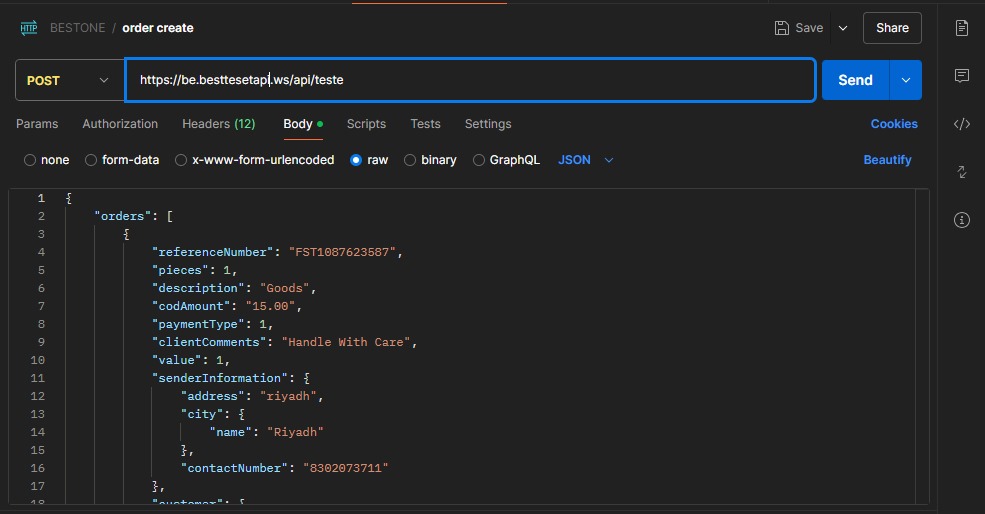
This API guide will be used for tracking shipment using AWB’s on Shipping Company System to collect shipment data values for clients.
Test AWB# (Put anything which you successfully create) to get the shipment details
API Details:
Table 1. API Details
| Parameter | Type | Description | Mandatory | Code |
|---|---|---|---|---|
| awb | Varchar (20) | AWB Number is shipment unique number | Yes | 136,138 |
Request Example
Status Codes:
Main Category
| S.N | Main Status | code |
|---|---|---|
| 1. | Not Delivered | |
| 2. | On Process | OP |
| 3. | Pick Up Collected | PUC |
| 4. | Out for delivery | OD |
| 5. | Return | DL |
| 6. | Shelve | SH |
| 7. | In Transit | IT |
| 8. | Damage Shipment Arrival | DSA |
| 9. | Hold for pickup | |
| 10. | Delivered | POD |
| 11. | Booked-Pickup Scheduled | B |
| 12. | Received Inbound | RI |
| 13. | Ready For Delivery | RFDE |
| 13. | General Update | GU |
| 14. | CS Update | |
| 15. | Booked-reverse pick | RP |
| 16. | Cancelled as per Client request. | CCR |
| 17. | Forward to Delivery Station | FDD |
| 18. | Missing Shipments | MS |
| 19. | Damage Shipments | DS |
Shipment Cancel API
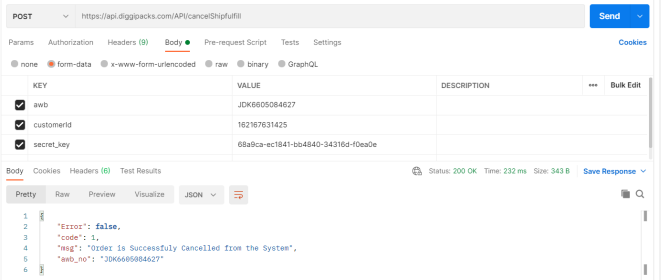
To cancel shipment, kindly send in Request Customer ID and Order ID of your system as Booking ID.
Url: https://api.fastcoo-tech.com/API/deleteShipment
  {

"customerId":"100219",
"booking_id":"TEST00200"
}
Response Codes:
- Code 1: Successfully Cancelled
- Code 5: Unable to find order, or it’s already cancelled
- Code 0: Authentication Error, Please check Secretkey or Account Number
RATE CALCULATOR API
REQUIRED PARAM: { "customer_id":"5f9aa3372af88", "service_id":"Express Service", "origin":"Riyadh", "destination":"Riyadh", "weight":20 }
Url: https://api.fastcoo-tech.com/API/rate
 {
"customer_id":"5f9aa3372af88",
"service_id":"Express Service",
"origin":"Riyadh",
"destination":"Riyadh",
"weight":20
}
PRINT SHIPPING LABEL API
All you have to do is send request for the label followed by the API to get the PDF label
Url: https://api.fastcoo-tech.com/API/Print/
Eg: https://api.fastcoo-tech.com/API/Print/FSL5836143515